The back-office assistantthat proves its work.
Give Weaver the matching, the cleaning, the reports and the pile of documents. It does the work on your computer and links every number to the row or page it came from. Spreadsheets, PDFs, scans, databases and logs.
- No card
- 30 requests a month, free
- Nothing is uploaded
- Windows and Mac
- Excel
- CSV
- JSON
- Scans
- Postgres
- MySQL
- Web APIs
- Google Cloud logs
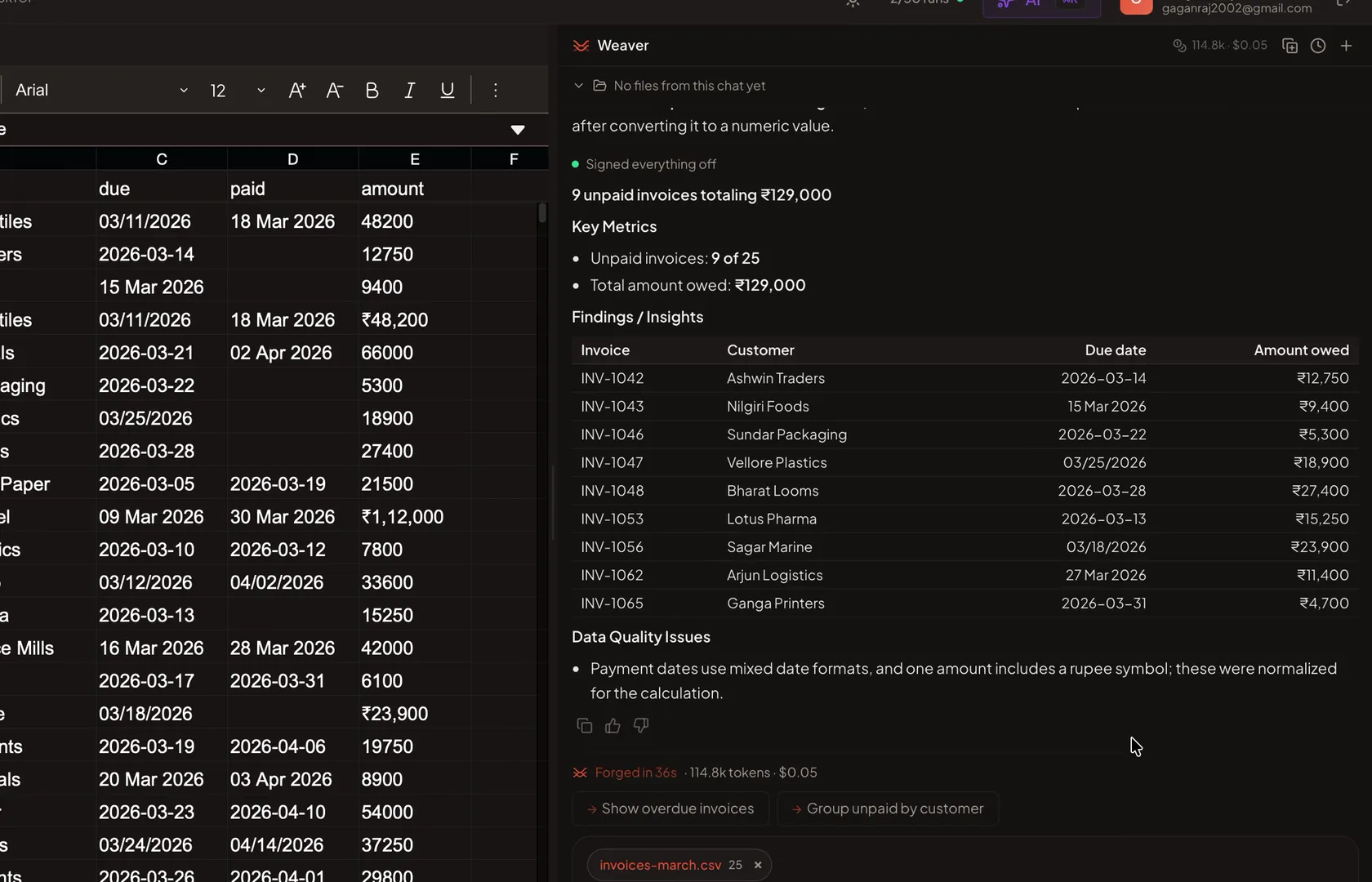
Ask once. Weaver works until it is done.
You do not set anything up. You do not approve a plan. You say what you want. Weaver does the work, checks it, and fixes it, until your answer is ready.
- 1
Open your file
An Excel sheet, a PDF, a scan, or a database. Open it the way you open any file.
- 2
Say what you want
Type it the way you would say it to a colleague. For example: which invoices are not paid, and what is the total? No formulas. No code. No menus to learn.
- 3
Weaver does the work
Weaver works like a careful assistant. It does one step, checks the result, and decides the next step. If something is wrong, it fixes it and tries again. It stops only when the answer is ready. Here is one real job, step by step.
- 1Looked at the Paid column.9 of 25 rows are empty. The dates are written in three different ways.
- 2Found the unpaid rows and added up the amounts.9 unpaid. But one amount was typed as ₹23,900, with the sign and the comma, so the total came out wrong.
- 3Removed the ₹ sign and the commas. Added them up again.₹129,000. Correct this time.
- 4Wrote the answer.A table of the 9 unpaid invoices and the total. 36 seconds in all.
- 4
Get your answer
A short written answer. Plus the table, chart or file it made, ready to open or save.
- Weaver picks Quick, Standard or Expert for each question by itself. Expert takes longer and is better with difficult files.
- You can send your next question while Weaver is still working. It waits its turn.
Opens spreadsheets, Word files, PDFs, scans, databases, logs and APIs.
Spreadsheets and files
- Excel
- CSV
- JSON
- Parquet
- TSV
- JSON Lines
- Arrow
- XML
- Text
- Logs
- Markdown
- SQLite files
Documents
- Scans
- Word
- PNG
- JPEG
- TIFF
- WebP
- BMP
- HEIC
Databases
- Postgres
- MySQL
- SQLite
- MariaDB
Web APIs and logs
- Web APIs
- Google Cloud logs
Today
Upcoming
What people ask it, and what comes back.
- Find every customer that appears twicean answer
- Which month did returns spike?a chart
- Standardise every date to DD-MM-YYYYa clean file
- Fill in the missing pincodes, row by rowfilled-in rows
- What's in this 900 MB export?an answer
Your file stays here. Only a description leaves.
Every parse, edit, chart and export happens on your own machine. Personal details are replaced here, before anything is sent.
Stays on your machine
invoices-march.csv
- The file itself, always
- Every parse, edit, chart and export
- Code that runs here, with no internet
- Your database passwords
- Your messages and every result
Can leave
- What you type
- Column names and types
- Counts, ranges and how many are blank
- Up to fifty values from ordinary columns
- Counts only from personal columns, nothing from the most sensitive
- What the code prints back
- File and folder names inside your workspace
- The title and a short summary of each chat
replaced before it leavesarjun@meridian.in[REDACTED:email]
Exactly what goes out, and to whom
Emails, phone numbers, card numbers, ID numbers, IP addresses and access keys are found and replaced on your machine first. That matching works on patterns. It is thorough, not a guarantee.
What leaves goes to us, then to one of several AI providers that work out the steps. Which one depends on the mode you pick and on what is up at the time. The names, as of today, are in the privacy policy. All of them are commercial providers. A model on a server you control, or one that never leaves your country, is planned and not shipped.
Databases you connect are read-only, and there is no setting that changes that.
Read the privacy policyWhy not just use ChatGPT or Claude?
Both open files, run code and hand back a spreadsheet. Both do more than Dataweaver does. What differs is where the work happens, and what leaves your machine.
- Dataweaver
- ChatGPT or Claude
- Your file is parsed here. It is never uploaded.
- Your file is uploaded, or read off your disk into a session on their servers.
- The code runs here, on your machine, with no internet.
- The code runs on their servers, on their copy of your file.
- Emails, phone numbers, card and ID numbers are replaced before anything leaves, and put back when the answer comes home.
- Sent as typed. On personal plans, kept and used to train their models unless you turn that off.
- Databases are read-only, and the query runs here. There is no setting that changes that.
- A connector, and the rows it returns go to their servers.
- A job that calls a web API once per row, for a hundred thousand rows, runs here in the background. Quit, and it pauses. Open the app, and it carries on.
- Their code sandbox blocks the calls, or an admin has to allow them first.
They also browse, write, draw, remember you across chats and plug into hundreds of apps. Dataweaver does none of that. It does data files and databases, on your machine.
Questions people ask first.
What is Dataweaver?
A desktop app that does data work for you. Open a spreadsheet, a PDF, a scan or a database, say what you want in plain English, and Dataweaver works out the steps and runs them on your own computer. Your file is never uploaded. What the AI gets is a description of it, and your words with personal details replaced.
Can it match two lists and tell me what does not add up?
Yes. That is most of what people hand it. A bank statement and the books, a purchase register and GSTR-2B, a settlement file and your orders, an estimate and the actual. Give it both, say what should match, and you get back one file with every row marked matched, missing or different, and the reason next to it.
Can it read PDFs and photos of paper?
Yes. Open a PDF, a scanned page or a photo (PNG, JPEG, TIFF, WebP, BMP) beside your spreadsheets. Scanned pages are read on your computer, and tilted scans are straightened first. Point a job at a folder of PDFs and it reads every page of every file into one table.
How do I know a number is right?
When the answer comes from a document, every number in it is a link. Hover to see the line it came from. Click and the page opens with that line outlined. A Sources line under the answer lists every document and page it used.
What does Dataweaver actually send?
Not your file. The file is never uploaded, and every parse, edit and export runs on your machine. What goes up is a summary: what you typed, your column names and types, statistics like null counts and ranges, and a small sample of values. Emails, card numbers, phone numbers, account IDs and API keys are found and replaced on your machine before anything is sent. Nothing you type and nothing Dataweaver writes is stored on our servers.
Can it answer questions and make charts, or only clean things up?
Both. Ask what is going on and Dataweaver profiles the file and reports what it finds: where the missing data clusters, which columns barely vary, which are skewed, and which two files will join and on what column. Ask for a chart and you get one of fifteen kinds built from real columns in your file, which you can keep on a dashboard that re-reads your data rather than freezing a picture of it.
What if it gets something wrong?
Your original file is not edited in place, so the worst case is a new file you delete. The one exception is a Word file you ask Weaver to change, and Undo brings back the earlier version in one step. Every save also reports what it could not carry across. Excel formulas, for example, are saved as their last computed value, and Dataweaver tells you that rather than letting you discover it later.
Can it write to my database?
No, and that is enforced rather than promised. Every statement is parsed and checked against a list of read-only shapes, the database session itself is set read-only, and SQLite additionally runs under query_only. Connect Postgres, MySQL, MariaDB or SQLite to browse the schema, search for the tables you need, run SELECT queries and export the results.
How big a file can it open?
There is no row limit and no size tier. Spreadsheets in the millions of rows open, and how far you can go depends on your own machine's memory. Raw text, log and XML files are capped at 50 MB for whole-file operations such as the PII scan.
Do I need to know formulas or code?
No. If you can describe what you want in a sentence, such as remove the duplicates, put the dates in one format, or flag rows where the total is blank, that is enough. Dataweaver writes the code and runs it for you.
Does it work offline?
No. Dataweaver needs you to sign in, and each request needs a connection so it can work out the steps. Your files still stay on your machine, but this is not an offline tool.
What can it open?
Spreadsheets (.xlsx, .xls, .xlsm, .xlsb, .csv, .tsv), Word files (.docx, .doc), documents (.pdf, .png, .jpg, .jpeg, .tif, .tiff, .webp, .bmp, and .heic photos on a Mac), data files (.json, .jsonl, .ndjson, .parquet, .arrow, .ipc, .xml), text and logs (.txt, .log, .md), and SQLite database files (.db, .sqlite). It also connects to Postgres, MySQL and MariaDB, to any REST API with an OpenAPI description, and to Google Cloud Logging. Saving back out gives you Excel, CSV, TSV, JSON, JSONL, Parquet, Arrow or XML, and Weaver can also make Word and PDF files.
Is it free?
Thirty requests a month, free, with no card. One request is one thing you ask for, however many steps it takes to finish. Browsing your data, previews and edits you make yourself do not count. Paid plans raise the monthly allowance and, once it is used up, keep working on the faster model rather than stopping you.
Which platforms?
Windows 10 or later on 64-bit, and macOS on Apple Silicon. There is no Intel Mac build and no Linux build yet.
Point it at the file you keep putting off.
Thirty requests a month, free. No card.
Download for MacMac on Apple SiliconWindows 10 or later, 64-bit